Hash Slot Calculator Shows the Redis or Valkey Cluster Slot for Any Key and Catches CROSSSLOT Errors
Code that ran fine against a single Redis or Valkey server often breaks the day it moves to a cluster. An MGET, a MULTI block or a Lua script that touched three keys now gets CROSSSLOT Keys in request don't hash to the same slot, because in a cluster those keys live on different servers.
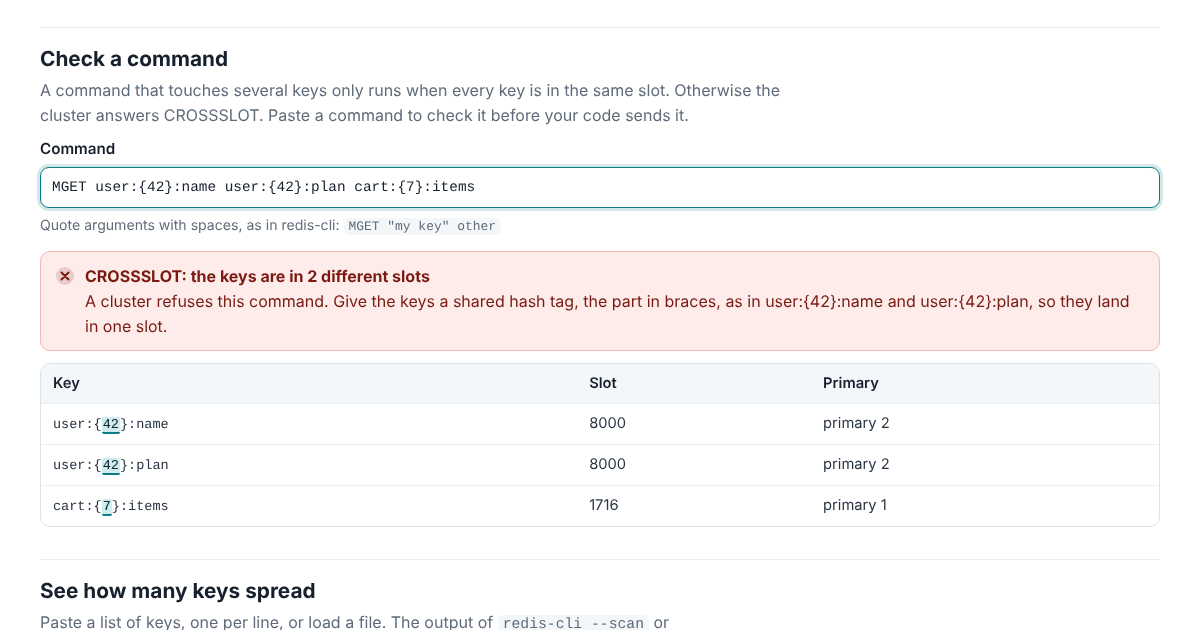
The Hash Slot Calculator shows where keys land before that happens. Type a key and you get its slot and the primary that holds it, with the hashed part of the key marked. Paste a command and it tells you whether a cluster would run it. Paste a whole key list and it shows how the keys spread across your primaries, the busiest slots and the hash tags in use.
It runs in your browser and doesn’t send anything anywhere. The page’s security policy also stops it from fetching or loading anything from another site, so your keys stay on your machine.
Why Keys Land Where They Do
A cluster splits keys into 16,384 slots and gives each primary a range of them. A key’s slot comes from a checksum, CRC16 over the key’s bytes, keeping the last 14 bits. The same key is in the same slot on every cluster, and only the slot-to-primary map is yours.
Hash tags put keys in the same slot on purpose. When a key holds a part in braces, only that part is hashed, so user:{42}:name and user:{42}:plan share slot 8000. The rule has corners that catch people. Only the first { counts, and only the first } after it, so foo{{bar}} hashes {bar. Empty braces don’t count, so foo{}{bar} hashes the whole key. The calculator follows the server’s rule exactly, and marks what it hashed.
It also knows which arguments of a command are keys: every key in MGET, every other argument in MSET, the keys after numkeys in EVAL, the streams after STREAMS in XREAD, and so on for every multi-key command in Redis 8.10 and Valkey 9.1. Paste a CLUSTER NODES listing and the answers use your real layout.
What Testing Turned Up
The tool was checked against real servers, Valkey 9.1.2 and Redis 8.10.2 built from source. 10,029 keys landed in the same slots the servers gave them. For 868 commands on Valkey and 924 on Redis it picked out the same keys as the servers did. And 686 multi-key commands sent to a live Valkey cluster and 742 to a Redis cluster got the CROSSSLOT answer it predicted, with one exception.
The exception is MSETEX, which sets several keys with one expiry and is new in both Valkey 9.1 and Redis 8.4. Redis refuses it with CROSSSLOT when the keys are in different slots, and redirects it with MOVED when it reaches the wrong node. Valkey 9.1.2 did neither, and ran all 9 cross-slot MSETEX commands it was sent. Whichever node received one wrote every key itself, including keys whose slots belonged to another node, and answered 1, “all keys set”. A later GET for those keys went to the node that owns their slot and found nothing.
The cause is in Valkey’s source: the command is declared without the function cluster routing uses to find a command’s keys, so routing sees none. Until that changes, keep MSETEX keys in one slot with a hash tag, and make sure your client sends it to the primary that owns that slot. The calculator adds that note to every MSETEX it checks, and the transcript is published with the code.
A smaller difference turned up with sharded pub/sub. Redis 8.10.2 runs SUNSUBSCRIBE on any node, whatever the slots of its channels, while Valkey 9.1.2 routes it like SSUBSCRIBE and refuses channels from different slots. The calculator notes that as well.
Use It Anywhere
The calculator’s logic is one JavaScript file with no dependencies, open source under the Apache License 2.0. Besides the web page, it runs from the command line, so a CI job can check the commands in your code before they ship:
node slots/cli.js --check 'MGET user:{42}:name user:{42}:plan'
redis-cli --scan | node slots/cli.js --file - --nodes nodes.txt --summary
The manual and the tests are in the slots folder on GitHub.