Mass Insert Builder Turns CSV and JSON Into a Bulk-Load File for Redis and Valkey
The slow way to load a million keys into Redis or Valkey is a loop that sends a command, waits for the answer, and sends the next. Most of the time goes on the waiting. At half a millisecond per round trip, a million commands take more than eight minutes before the server has done anything hard.
redis-cli --pipe and valkey-cli --pipe skip the wait. They stream commands as fast as the connection takes them, read the replies as they arrive, and end with a count: errors: 0, replies: 1000000. The catch is that they want their input already in the Redis protocol, where every value is preceded by its length in bytes. The Mass Insert Builder writes that file for you.
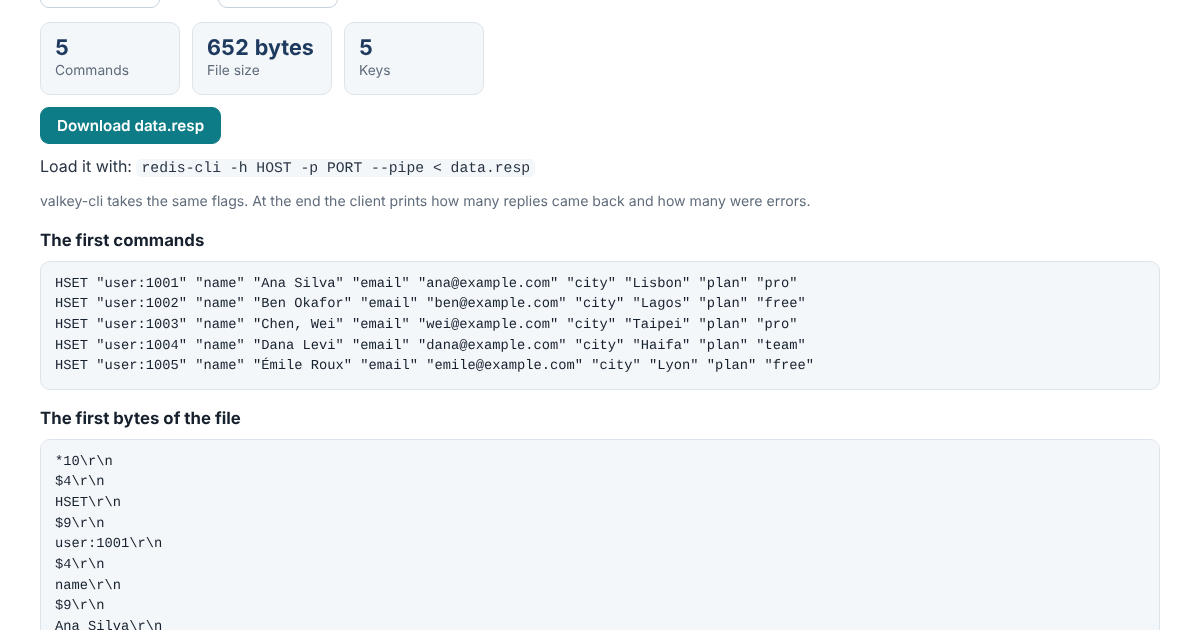
Paste CSV, JSON or plain commands, say how each record should be stored, and download data.resp. It runs in your browser and doesn’t send anything anywhere, and the page’s security policy stops it from fetching or loading anything from another site.
From Rows to Keys
The key is a template: user:${id} takes the id field of each record. For a cluster, put the shared part in braces, cart:{${user}}:items, so related keys land in the same slot. Then pick how each record is stored:
- A hash, with every field not used in the key, or the ones you list.
- A string, from one field or the whole record as JSON.
- A list or a set, one field per record, added to the key’s list or set.
- A sorted set, from a score field and a member field. Records whose score isn’t a number are skipped and listed, so one bad row doesn’t sink the file.
An expiry in seconds goes on every key. “Delete each key first” makes the file safe to load twice, since without it a second run would add every list item again.
Why the Byte Count Matters
The protocol is simple enough that people write it with a short script, and that’s where loads go wrong. The length before each value counts bytes, not characters. é is one character and two bytes. Get one length wrong and the server reads the rest of the stream out of step, and every command after it fails. Values with line breaks, quotes or binary bytes need no escaping at all, as long as the lengths are right. The builder counts bytes, and the page shows the first bytes of the file with every line ending visible.
The second half of the page goes the other way. Paste protocol bytes from a network capture, a log line with \r\n written out, plain hex, or a hex dump from hexdump -C, xxd, od -t x1 or Wireshark’s Follow TCP Stream, and read them as commands and replies, in RESP2 or RESP3.
Loaded Into Real Servers
Files from the builder were loaded into Valkey 9.1.2 and Redis 8.10.2, and every key was read back and checked against the source data. On both servers that covered 2,000 CSV rows as hashes with expiries, 3,000 rows as 150 lists in their original order, 2,500 JSON lines as 300 sets, 1,887 sorted-set scores written eight different ways, and 1,500 JSON records with 20-digit IDs, stored byte for byte. Every load ended with errors: 0.
--pipe sends everything to one server and doesn’t follow cluster redirects. For a cluster, split the data by primary first: the Hash Slot Calculator shows which primary owns each key. The builder’s logic is one JavaScript file with no dependencies, open source under the Apache License 2.0, and it runs from the command line too:
node pipe/cli.js csv users.csv --key 'user:${id}' --type hash --ttl 3600 | redis-cli --pipe
The manual and the tests are in the pipe folder on GitHub.