Memory Calculator Works Out How Much Memory Redis and Valkey Use for Your Keys, Matched to the Byte on 15 Versions
How much memory do fifty million sessions need? The usual answer is a test: load a sample, read INFO memory, multiply. That works for the version you tested, with the key names and values you happened to use. Change the server, add a TTL, or let a hash grow past 512 fields, and the figure moves, sometimes by half.
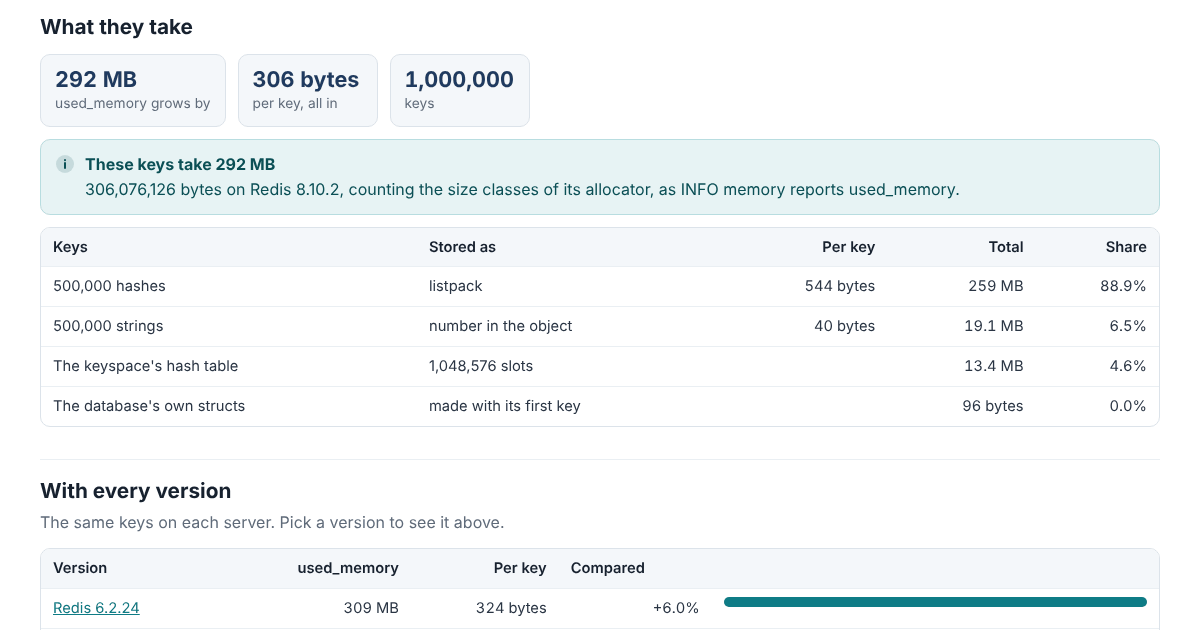
The Memory Calculator does the arithmetic the server does. You describe the keys, how many there are, how long the names are and what they hold, and it works out how much used_memory grows on each of 15 versions of Redis and Valkey: the encoding each value gets, the blocks the allocator hands out, and the hash tables that hold the keys and their expiry times.
It runs in your browser and doesn’t send anything anywhere, and the page’s security policy stops it from fetching or loading anything from another site.
A Key Costs More Than Its Data
Take ten million keys like user:1234567, 13 bytes, each holding an 8-byte value. That’s 21 bytes of data a key. Redis 7.2 uses 85 bytes a key for them, Redis 8.10 uses 65 and Valkey 9.1 uses 55.
The rest is bookkeeping. Every allocation comes in a fixed size from jemalloc, the allocator these servers are built with: 8, 16, 24 and so on to 64 bytes, then four sizes in each doubling. Up to Redis 8.0 a key is a 24-byte entry in the keyspace’s hash table, a copy of its name and a 16-byte object pointing at the value, each rounded up to its size. The table itself adds an 8-byte slot for every key, rounded up to a power of two. Redis 8.2 and Valkey 8.1 fold the name, the object and a short value into one block, which is where most of the savings come from.
The Limit That Doubles a Hash
Small hashes, sets, sorted sets and lists live in one compact block, a listpack. Past a limit the server turns them into hash tables or skiplists, and every field becomes allocations of its own. On Redis 8.10, a hash under a 16-byte key with 512 fields of 8-byte names and 10-byte values takes 12,328 bytes. Add one field and it takes about 22,357. The limit is hash-max-listpack-entries, 512 by default, and the calculator says when your hashes are past it and what raising it would save. It also warns that a bigger listpack is slower to search, which is why the limit exists.
Packing Small Strings Into Hashes
That limit is also what makes an old trick work. Ten million small strings each pay for a key of their own. Kept as fields of 100,000 hashes instead, user:1234567 as field 67 of user:12345, they fit in listpacks with numbers for field names. On Redis 8.10 that’s 623 MB down to 127 MB. The calculator works it out for 64 to 1,000 fields a hash and names the settings each choice needs. The catch is that a hash has one TTL for all its fields.
What an Upgrade Changes
The versions differ more than their release notes suggest. A million keys of 20 bytes with 30-byte values take 107 MB on every Redis up to 8.0 and 82 MB from Redis 8.2. Valkey 8.1 needs 85 MB and Valkey 9.1, which fits more values inside the key’s object, needs 93: here the combined block is 65 bytes, one past a size class, so it takes 80 where two separate blocks took 72. The calculator shows every version side by side, so an upgrade comes with a number attached.
Checked to the Byte
All 15 versions, Redis 6.2 to 8.10 and Valkey 7.2 to 9.1, were built from source and given keys of more than 6,200 shapes each: strings around every size where the encoding changes, TTLs, numbers, values of a megabyte, tens of thousands of keys around the sizes where the tables double, and collections below and above every limit. For each case a script read used_memory, wrote the keys, waited for the server to finish rehashing and read it again.
Some of it is chance: which keys share a bucket in the hash tables, how many levels each skiplist node gets. Given what chance decided, the calculator matches every one of the 94,061 cases to the byte, apart from the skiplists of big sorted sets, which agree within a few standard deviations. Without that knowledge, its expected values land within three standard deviations of the measurement in 99.8% of the cases.
Try It
The calculator is one JavaScript file with no dependencies, open source under the Apache License 2.0. It also runs from the command line:
node memory/cli.js "50m strings key=44 value=300 ttl=100%" --compare
node memory/cli.js "10m strings key=13 value=8" --pack 100
The manual, the tests and the measurements they replay are in the memory folder on GitHub.