Revision Viewer Opens etcd Snapshots and Shows Every Revision of a Kubernetes Object the Way kubectl Prints It
A Kubernetes cluster stops taking changes, and the API server reports etcdserver: mvcc: database space exceeded. etcd has hit its quota, 2 GiB unless someone raised it, and raised the NOSPACE alarm. Now the questions are what filled it, and whether a compaction, a defrag or a cleanup will get it back. etcd’s own tools give totals. They don’t say which resources take the space.
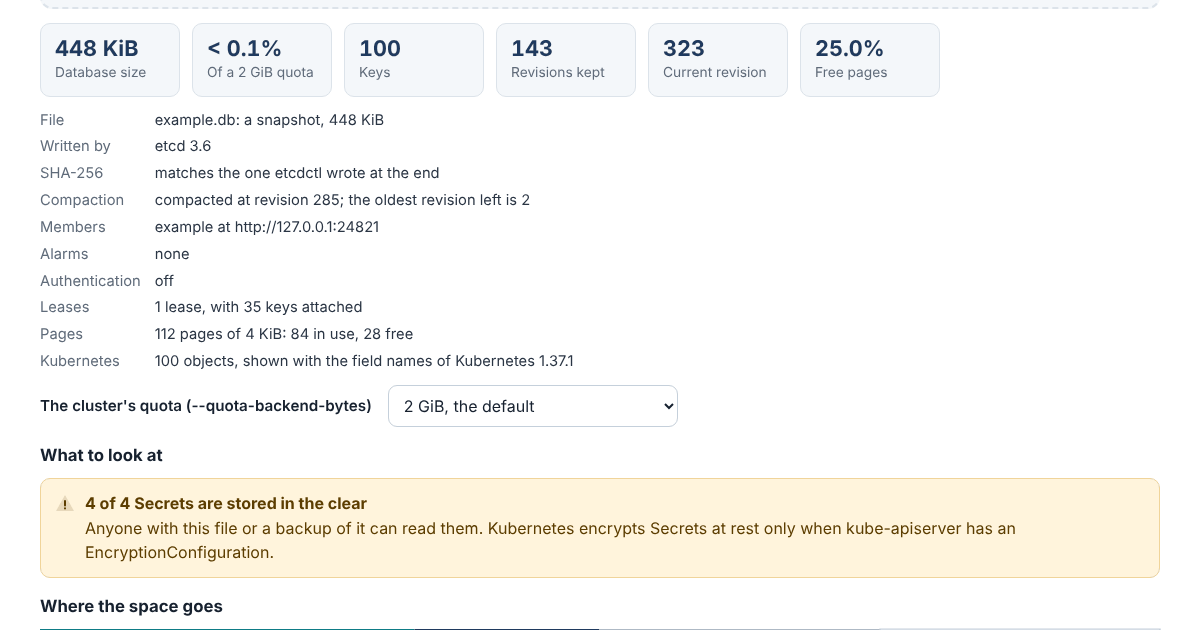
The Revision Viewer opens an etcd snapshot, the file etcdctl snapshot save writes, and shows what fills it: how close it is to the quota, which keys and Kubernetes resources take the space, how much is old revisions that compaction would remove, and how much is free pages that only a defrag gives back. Pick a key, and you see every revision the file keeps and what changed in each.
It runs in your browser and doesn’t send anything anywhere, and the page’s security policy stops it from fetching or loading anything from another site. A snapshot holds every Secret in the cluster that isn’t encrypted at rest, so that matters more than usual.
Why the File Grows
etcd never overwrites a value. Each write adds a revision and keeps the old one, so clients can watch every change. Compaction removes old revisions, and kube-apiserver runs it every five minutes, but five minutes is plenty for a busy key: a node’s heartbeat lease changes every ten seconds. Compaction doesn’t shrink the file either. It turns the space into free pages for etcd to reuse, and only a defrag hands them back to the disk. The viewer splits the database into current values, old revisions, free pages and the space the page format itself takes, so it’s clear which fix applies.
Kubernetes Objects You Can Read
Kubernetes stores its objects in etcd as protobuf, which looks like noise. The viewer decodes them with the field names of every kind Kubernetes 1.37 keeps in etcd and prints them the way kubectl get -o yaml prints them. Two revisions of a Deployment then differ by the lines that changed, and a history of a key reads like a change log. Custom resources, stored as JSON, show the same way. Secrets encrypted at rest show only the provider and key name, since the key isn’t in the file.
It also points out what deserves a look: alarms, a database near its quota, a hash that doesn’t match, Secrets stored in the clear, values over 1 MiB, and the usual reasons for a big database, such as events or managedFields taking a large share.
Checked Against etcd and Kubernetes
A script ran etcd 3.6.15, 3.5.34 and 3.4.45 and filled each the way a cluster does, with objects encoded by Kubernetes 1.37.1’s own Go packages. The viewer gives the same hash, size, revision and key count as etcdutl snapshot status, the same free pages as bbolt’s own tool, and the same value and revisions for every key as etcdctl get. All 141 Kubernetes objects in the snapshot decode to the same JSON as Kubernetes’ code makes of them, and 139 print byte for byte as kubectl prints them; kubectl can’t print the other two. A 198 MiB snapshot with 250,000 revisions opens in about three seconds in the browser.
Try It
The viewer is one JavaScript file with no dependencies, open source under the Apache License 2.0. A backup job can check each snapshot it saves:
node revisions/cli.js backup.db --quota 8GiB
node revisions/cli.js backup.db --history /registry/deployments/shop/web
The manual, the tests and the snapshots they replay are in the revisions folder on GitHub.